# Desire Concepts
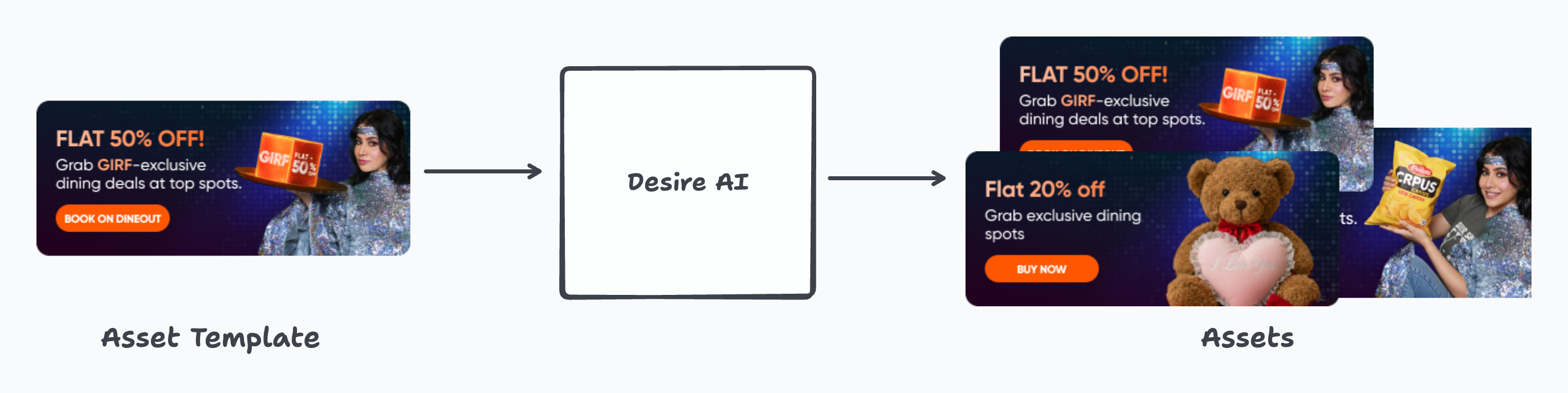
Desire takes a simple idea and makes it scalable: start with well-designed templates, then use structured inputs and AI to generate many final assets quickly and consistently. At the heart of Desire are **Asset Templates**. An Asset Template is a Figma file created by designers that follows a standard naming convention. These conventions allow Desire to understand which parts of the design can be changed (for example, text, images, prices) and how.
To keep things organised as the number of templates grows, Desire introduces a few lightweight concepts:
* [**Asset Templates**](https://docs.desire.acik.in/basics/asset-templates) **-** Individual Figma templates that define how a single banner or asset should look.
* [**Themes**](https://docs.desire.acik.in/basics/themes) **-** Asset Templates that look visually similar (same layout style, typography, or design language) are grouped into Themes. Themes make it easier to browse and choose the right visual style without reviewing every template individually.
* [**Verticals**](https://docs.desire.acik.in/basics/verticals) **-** Themes are associated with business areas, called Verticals, such as Instamart, Dineout, or other business lines. This ensures that teams only see templates that are relevant to their use case.
Putting this together, working with Desire typically happens in two steps:
1. **Design phase -** Designers create Asset Templates in Figma for different business Verticals and group visually similar templates into Themes.
2. **Execution phase -** Operators select an Asset Template, provide inputs (like copy, images, offers, or locations), and scale it for their specific needs.
When an operator creates assets, Desire automatically:
* Creates a clone of the selected Asset Template in Figma
* Updates the relevant Figma nodes based on the defined naming conventions and inputs
* Registers the new asset in its database
* Exports the final banners, ready for use
This separation allows designers to focus on quality and consistency, while operators can independently create and scale assets without needing design expertise.
---
# Agent Instructions: Querying This Documentation
If you need additional information that is not directly available in this page, you can query the documentation dynamically by asking a question.
Perform an HTTP GET request on the current page URL with the `ask` query parameter:
```
GET https://docs.desire.acik.in/getting-started/desire-concepts.md?ask=
```
The question should be specific, self-contained, and written in natural language.
The response will contain a direct answer to the question and relevant excerpts and sources from the documentation.
Use this mechanism when the answer is not explicitly present in the current page, you need clarification or additional context, or you want to retrieve related documentation sections.
.jpeg)