Campaign Lifecycles
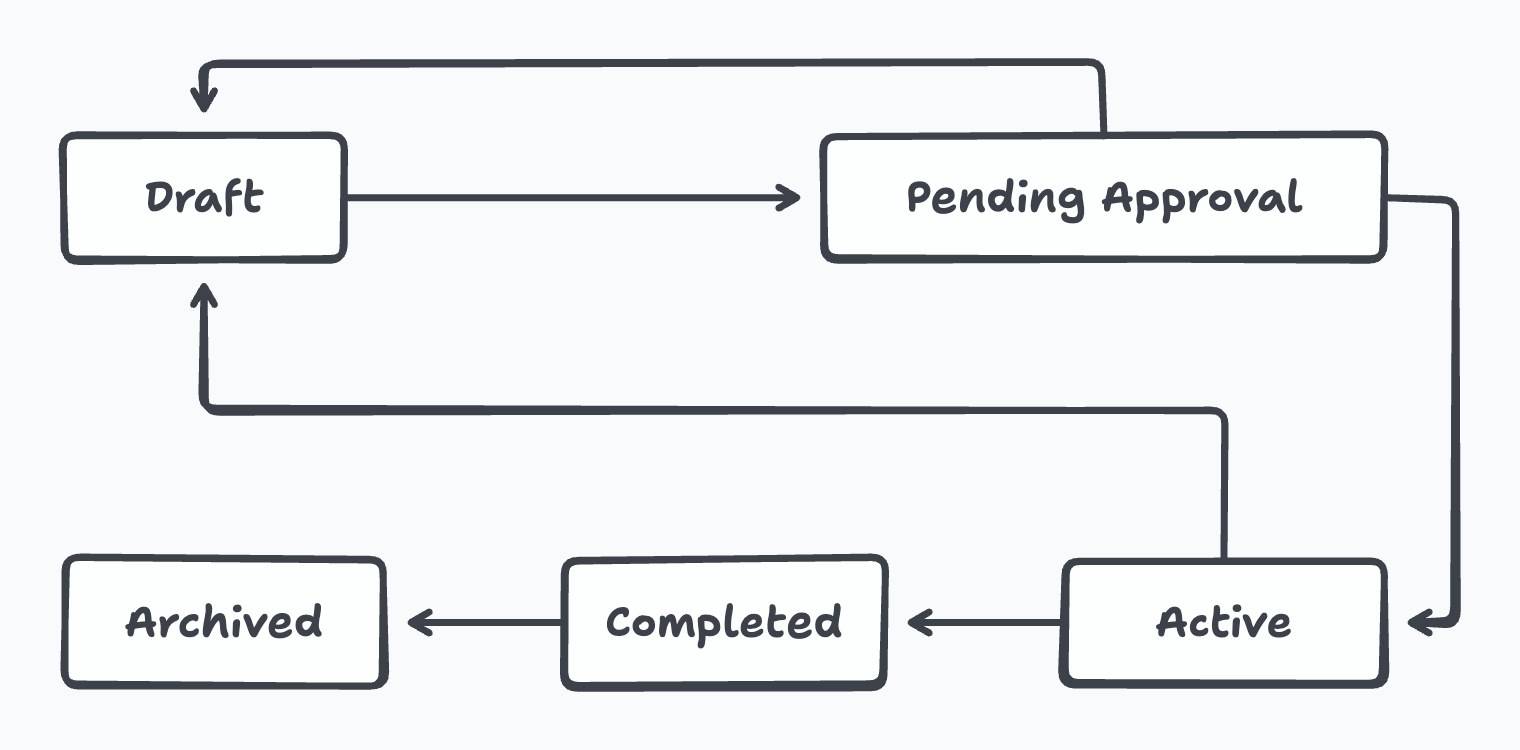
This document outlines the different statuses through which a campaign passes.
Draft
When a campaign is created, it starts in the Draft status. Campaigns in this status are editable, and allow the operator to make changes in the display text, product image etc. Once the operator feels that the design has reached the desired level of maturity, the operator can request for approval, moving the campaign to the Pending Approval status.
Pending Approval
When the campaign is in the Pending Approval status, operators can no longer make any edits. However, members from the selected approver group will be able to look at all the designs and Approve or Reject them. The approver can also leave feedback for the operator as needed. (Read more about Campaign Approvals). The approver can finally send the campaign back to Draft status if changes are required, or approve it and move it to the Active status.
Active
When a campaign is in the Active status, operators will be able to consume the generated assets. Conceptually, the campaign is to be in the Active status when the assets get consumed by the app. There are some urgent situations when edits are required even after assets are consumed, and Desire allows for a campaign to be directly moved to the Draft status to handle this. Alternatively, a campaign can move to the Completed status once the time period is done.
Completed
A campaign in the Completed status means that no subsequent action is required. From here, a campaign can only be moved to the Archived status.
Archived
Campaigns in the Archived status are at the final state of the campaign. These are useful for campaigns that will no longer be actively referred.
Last updated